

Overview
Digital wallets provide instant, mobile-first payment experiences. Popular in Latin America for their ease of use and accessibility.Processing
Instant confirmation
Mobile First
Optimized for phones
No Card Needed
Wallet balance only
Available Wallets
- Colombia
- Global
- Coming Soon
How It Works
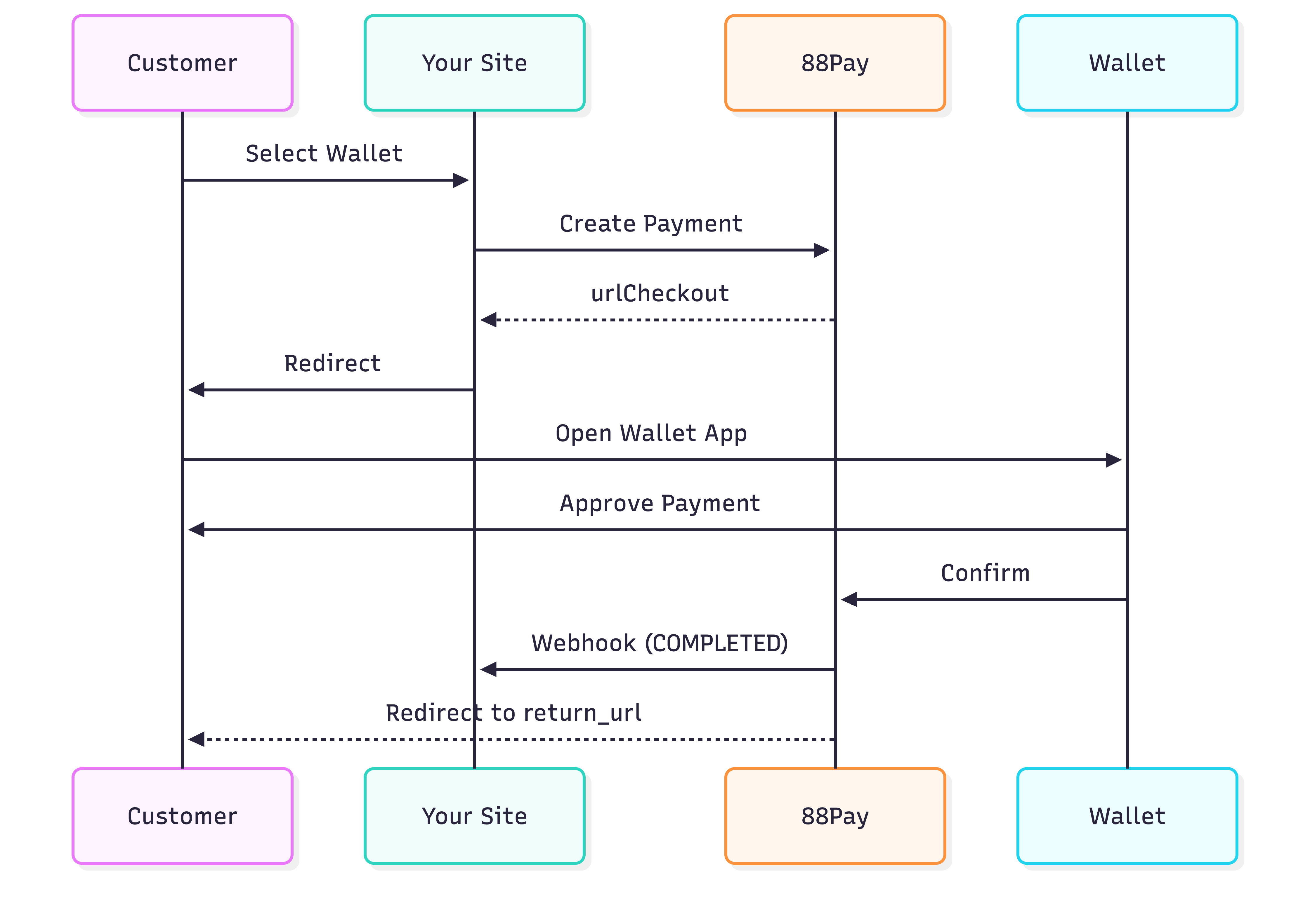
Create Wallet Payment
Nequi Example
Response
Method Codes
| Wallet | method_code | currency | Countries |
|---|---|---|---|
| Nequi | NEQUI | COP | 🇨🇴 Colombia |
| Daviplata | DAVIPLATA | COP | 🇨🇴 Colombia |
| PayPal | PAYPAL | USD, EUR, etc. | Global |
| Mercado Pago | MERCADOPAGO | Local currency | LATAM |
Customer Experience
- Nequi / Daviplata
- PayPal
Time: 30 seconds to 2 minutes
Mobile Optimization
Wallets work best on mobile devices:Deep Linking
QR Code for Desktop
Transaction Limits
| Wallet | Min | Max Per Transaction | Daily Limit |
|---|---|---|---|
| Nequi | 1,000 COP | 3,000,000 COP | 6,000,000 COP |
| Daviplata | 1,000 COP | 2,000,000 COP | 4,000,000 COP |
| PayPal | $1 USD | $10,000 USD | $60,000 USD |
| Mercado Pago | Varies | Varies | Varies |
Webhook Notifications
- COMPLETED
- REJECTED
Best Practices
Show Wallet Logos
Show Wallet Logos
Display recognizable wallet logos in checkout
Mobile-First Design
Mobile-First Design
Optimize checkout for mobile devices
- Large touch targets (min 44x44px)
- Simple, fast flow
- Deep linking to apps
- QR codes for desktop
Handle Timeouts
Handle Timeouts
Wallet payments can timeout if customer takes too long
Insufficient Balance Handling
Insufficient Balance Handling
Provide helpful message if wallet has insufficient funds
Testing
Sandbox Behavior
- Nequi / Daviplata
- PayPal
- Redirects to mock wallet page
- Click “Approve” to complete
- Click “Reject” to decline
- Instant webhook sent
Common Issues
Customer doesn't receive push notification
Customer doesn't receive push notification
Causes:
- Notifications disabled
- App not updated
- Phone offline
- Show manual link to open app
- Display QR code as fallback
- Offer alternative payment method
Payment pending for long time
Payment pending for long time
Normal for:
- Customer hasn’t approved yet
- Phone is offline
- Network issues
- Wait up to 10 minutes
- Send reminder notification
- Allow customer to cancel and retry
Deep link not opening app
Deep link not opening app
Causes:
- App not installed
- Wrong deep link format
- iOS/Android differences
- Always provide web fallback
- Show app download link
- Use universal links (iOS) / App Links (Android)
Next Steps
Webhooks
Handle payment notifications
Testing
Test wallet payments
Mobile Optimization
Optimize for mobile
API Reference
Technical documentation