

Overview
Card payments are the most popular payment method, offering instant processing and familiar checkout experience for customers.Supported Cards
Visa, Mastercard, Amex
Processing Time
Instant confirmation
3D Secure
Fraud protection included
How It Works
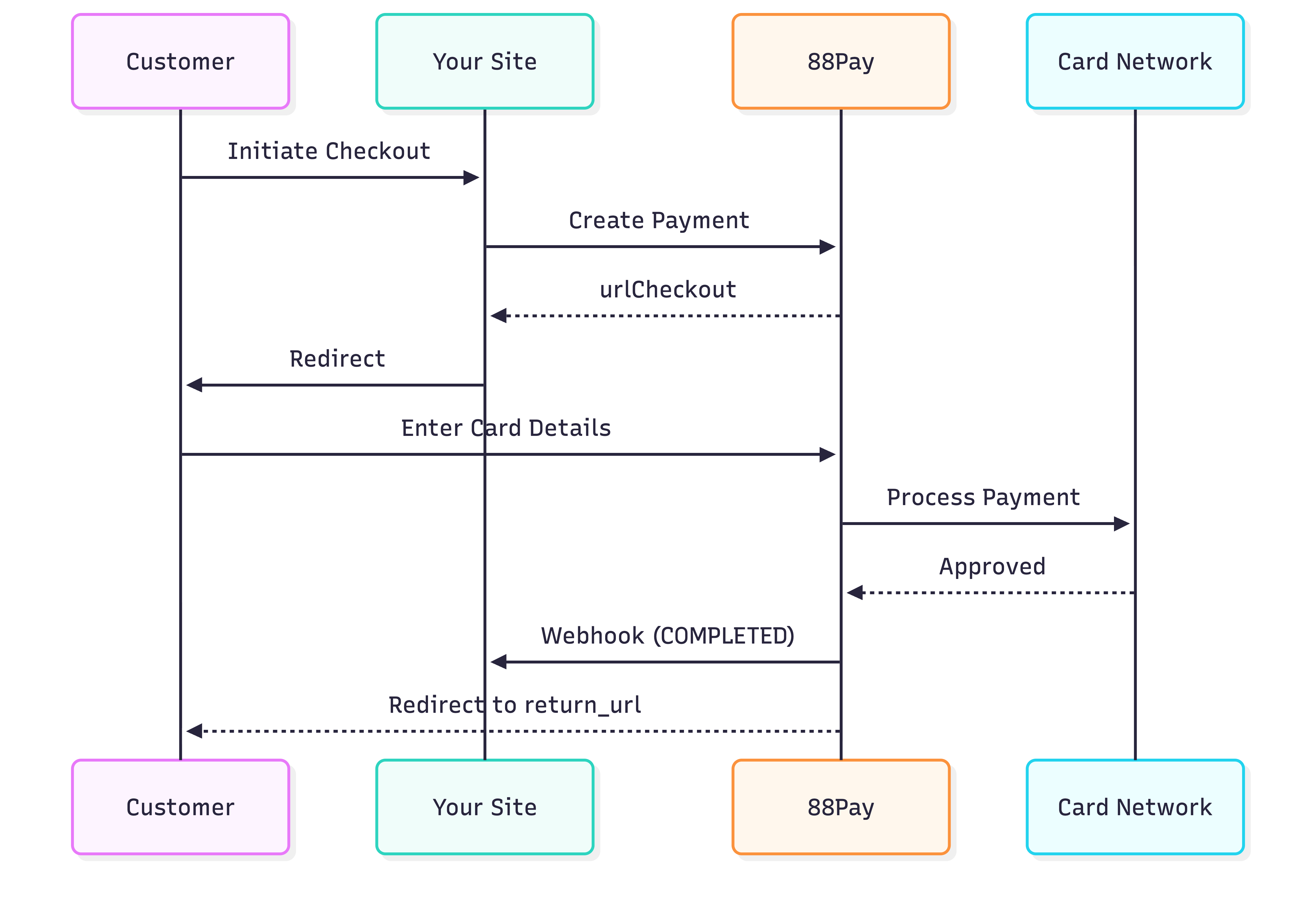
Create Card Payment
Request
Response
Customer Experience
3D Secure (if required)
Customer completes additional verification:
- SMS OTP
- Bank app approval
- Biometric authentication
Important: Don’t rely on
return_url for order fulfillment. Always use webhooks - customers may close browser before redirect.3D Secure Authentication
88Pay automatically triggers 3D Secure (3DS) when required by:- Card issuer requirements
- Transaction amount thresholds
- Risk assessment
3DS Flow
- Frictionless
- Challenge
Low-risk transactions
- No customer action required
- Approved in background
- Seamless experience
Currency & Country Support
| Country | Currency | Cards Accepted |
|---|---|---|
| 🇨🇴 Colombia | COP | Visa, Mastercard, Amex |
| 🇲🇽 Mexico | MXN | Visa, Mastercard, Amex |
| 🇧🇷 Brazil | BRL | Visa, Mastercard, Amex |
| 🇨🇱 Chile | CLP | Visa, Mastercard, Amex |
| 🇵🇪 Peru | PEN | Visa, Mastercard, Amex |
| 🇦🇷 Argentina | ARS | Visa, Mastercard |
Transaction Limits
- Colombia (COP)
- Mexico (MXN)
- Brazil (BRL)
- Other Countries
Min: 1,000 COP (~$0.25 USD)Max: 20,000,000 COP (~$5,000 USD)Daily limit: 50,000,000 COP per customer
Webhook Notifications
You’ll receive webhooks for these statuses:- COMPLETED
- REJECTED
Testing
Sandbox Test Cards
Use these cards in sandbox environment:| Card Number | Brand | Result | 3DS |
|---|---|---|---|
4111111111111111 | Visa | ✅ Approved | No |
5555555555554444 | Mastercard | ✅ Approved | No |
378282246310005 | Amex | ✅ Approved | No |
4000000000000002 | Visa | ❌ Declined | No |
4000000000000069 | Visa | ⏳ Pending | No |
4000000000003220 | Visa | ✅ Approved | Yes (challenge) |
- CVV: Any 3 digits (4 for Amex)
- Expiry: Any future date (e.g., 12/25)
- Name: Any name
Common Issues
Customer not redirected to checkout
Customer not redirected to checkout
Problem:
urlCheckout not received or redirect failsSolutions:Payment approved but order not fulfilled
Payment approved but order not fulfilled
Problem: Relying on
return_url instead of webhooksSolution:Card declined with no clear reason
Card declined with no clear reason
Common reasons:
- Insufficient funds
- Card expired
- Incorrect CVV
- 3DS authentication failed
- Card blocked by issuer
- International transactions disabled
- Verify card details
- Check with bank
- Try different card
- Enable international transactions
3DS authentication taking too long
3DS authentication taking too long
This is normal:
- 3DS adds 10-60 seconds to checkout
- Bank may require app approval
- Customer may need to find phone
- Set webhook timeout to 10 minutes
- Show “Processing…” message
- Don’t assume immediate response
Best Practices
Always Use Webhooks
Never rely solely on
return_url for order fulfillmentSet Timeouts
Allow 10 minutes for 3DS authentication
Handle Declines
Offer to retry with different card
Show Progress
Display “Processing…” during payment
Store Reference
Save
reference for tracking and supportTest Thoroughly
Test all scenarios: approved, declined, pending, 3DS
Security Notes
What 88Pay handles:- ✅ Card data collection
- ✅ PCI DSS compliance
- ✅ 3D Secure authentication
- ✅ Fraud detection
- ✅ Card tokenization
- ✅ Webhook verification
- ✅ Order fulfillment
- ✅ Customer communication
Next Steps
Webhooks
Implement payment notifications
Testing
Test card payments
Error Handling
Handle declined payments
API Reference
Full technical documentation