

Overview

Bank transfers allow customers to pay directly from their bank account without cards or cash. Ideal for larger transactions and B2B payments.

Processing

1-3 business days

Large Amounts

Up to $50,000 USD

Low Fees

Lower than cards

How It Works
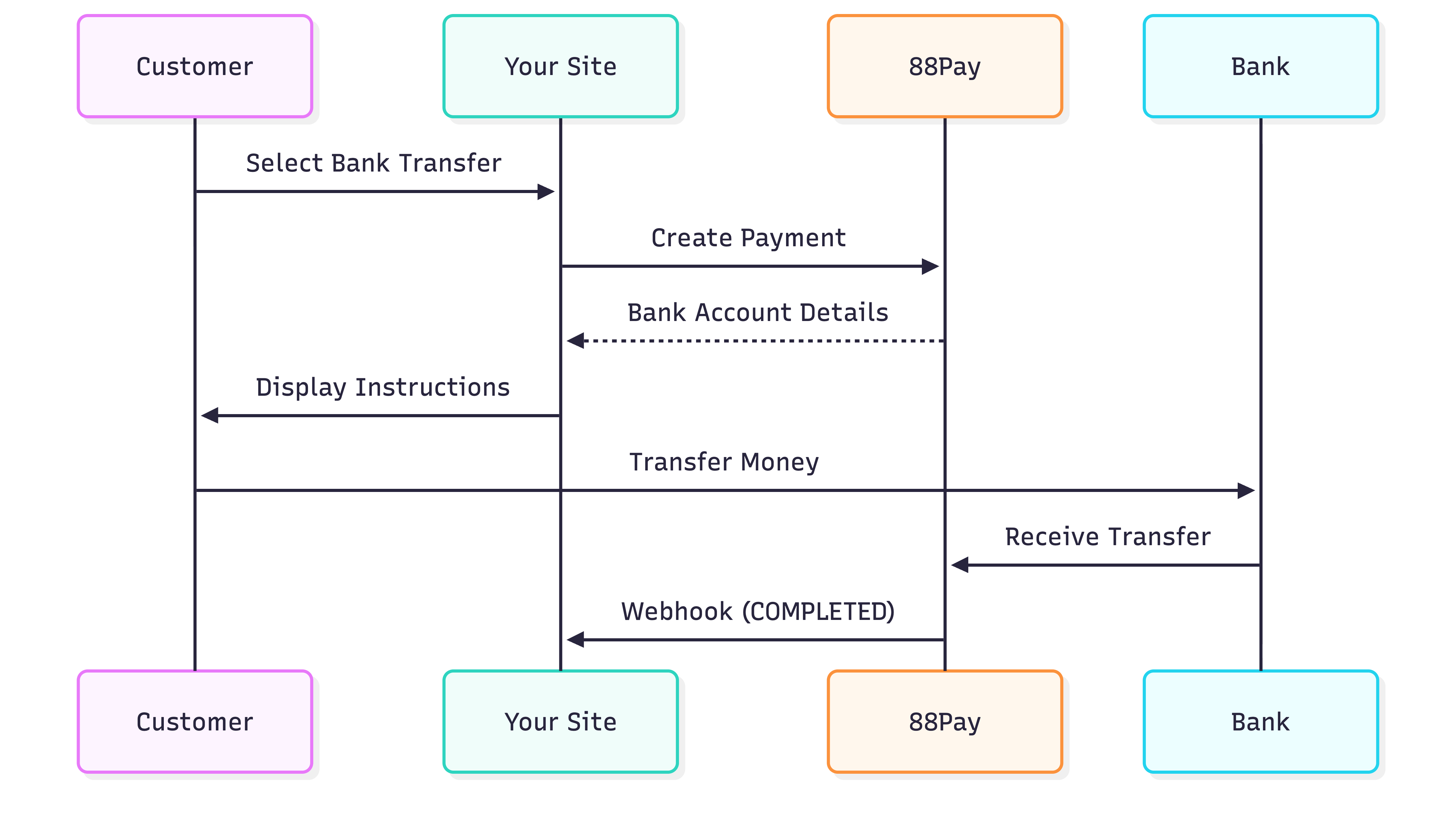
88Pay integration flow diagram

Supported Networks

PSE (Pagos Seguros en Línea)

Type: Real-time online bank transferProcessing: Instant to 24 hoursBanks: All major Colombian banksUser Experience:
  • Customer redirected to bank
  • Logs into online banking
  • Approves payment
  • Returns to your site
Max Amount: 50,000,000 COP (~$12,500 USD)

Create Bank Transfer Payment

Request

curl -X POST "https://api-sandbox.88pay.io/api/transactions/charges" \
  -H "Authorization: Bearer YOUR_TOKEN" \
  -H "x-session-id: YOUR_SESSION" \
  -H "Content-Type: application/json" \
  -d '{
    "flow": "PAYIN",
    "method_code": "BANK_TRANSFER",
    "method_category": "BANK",
    "amount": 100000,
    "currency": "COP",
    "country": "COL",
    "description": "Invoice #789",
    "customer_id": "company_xyz",
    "notification_url": "https://yoursite.com/webhook"
  }'

Response (Traditional Transfer)

{
  "status": "Success",
  "code": 200,
  "data": {
    "reference": "IP9BD7CJES6",
    "bank_details": {
      "bank_name": "Banco de Colombia",
      "account_number": "1234567890",
      "account_type": "savings",
      "holder_name": "88Pay Colombia SAS",
      "identification": "NIT 900123456",
      "reference_number": "IP9BD7CJES6"
    },
    "amount": 100000,
    "currency": "COP"
  }
}

Response (PSE - Redirect)

{
  "status": "Success",
  "code": 200,
  "data": {
    "urlCheckout": "https://pse.88pay.io/ABC123",
    "reference": "IP9BD7CJES6",
    "amount": 100000,
    "currency": "COP"
  }
}

Customer Experience by Method

1

Redirect to PSE

Customer redirected to PSE gateway
2

Select Bank

Choose their bank from dropdown
3

Login

Authenticate with bank credentials
4

Confirm

Review and approve payment
5

Return

Redirected back to your site
Time: 2-5 minutes

Displaying Bank Instructions

Example UI

// Bank transfer instructions component
function BankTransferInstructions({ data }) {
  return (
    <div className="bank-transfer-instructions">
      <h2>Complete Your Payment</h2>
      
      <div className="instructions-box">
        <h3>Transfer to this account:</h3>
        
        <div className="bank-detail">
          <label>Bank:</label>
          <span>{data.bank_details.bank_name}</span>
          <button onClick={() => copy(data.bank_details.bank_name)}>
            Copy
          </button>
        </div>
        
        <div className="bank-detail">
          <label>Account Number:</label>
          <span>{data.bank_details.account_number}</span>
          <button onClick={() => copy(data.bank_details.account_number)}>
            Copy
          </button>
        </div>
        
        <div className="bank-detail">
          <label>Account Type:</label>
          <span>{data.bank_details.account_type}</span>
        </div>
        
        <div className="bank-detail">
          <label>Beneficiary:</label>
          <span>{data.bank_details.holder_name}</span>
        </div>
        
        <div className="bank-detail highlight">
          <label>⚠️ Reference (IMPORTANT):</label>
          <span className="reference">{data.bank_details.reference_number}</span>
          <button onClick={() => copy(data.bank_details.reference_number)}>
            Copy
          </button>
        </div>
        
        <div className="bank-detail">
          <label>Amount:</label>
          <span>{formatCurrency(data.amount, data.currency)}</span>
        </div>
      </div>
      
      <div className="warning-box">
        <strong>Important:</strong> Include reference number 
        <code>{data.bank_details.reference_number}</code> in your transfer 
        description. This helps us identify your payment.
      </div>
      
      <div className="steps">
        <h3>How to Pay:</h3>
        <ol>
          <li>Open your banking app or website</li>
          <li>Create a new transfer</li>
          <li>Enter the account details above</li>
          <li>Include the reference number in the description</li>
          <li>Confirm the transfer</li>
        </ol>
      </div>
      
      <p className="timeline">
        💡 Your payment will be confirmed within 1-3 business days
      </p>
    </div>
  );
}

Transaction Limits

CountryMethodMinMaxProcessing
🇨🇴 ColombiaPSE10,000 COP50,000,000 COPInstant-24h
🇲🇽 MexicoSPEI100 MXN1,000,000 MXNSame day
🇧🇷 BrazilPIX10 BRL50,000 BRLInstant
🇨🇱 ChileTEF1,000 CLP10,000,000 CLP1-3 days
🇵🇪 PeruBank Transfer50 PEN50,000 PEN1-3 days

Webhook Notifications

    {
      "transaction_status": "PENDING",
      "transaction_reference": "IP9BD7CJES6",
      "transaction_payment_method": "BANK_TRANSFER"
    }
Meaning: Awaiting bank transferAction: Wait for customer to transfer

Best Practices

Make reference number prominent and easy to copy
    <div className="reference-highlight">
      <h3>⚠️ IMPORTANT - Include This Reference:</h3>
      <div className="reference-box">
        <code>{reference}</code>
        <button onClick={copyToClipboard}>Copy</button>
      </div>
      <p>Without this reference, we cannot identify your payment</p>
    </div>
Email bank details immediately
    await sendEmail({
      to: customer.email,
      subject: 'Bank Transfer Instructions',
      template: 'bank-transfer',
      data: {
        bank_details: data.bank_details,
        amount: data.amount,
        reference: data.reference
      }
    });
Clearly communicate processing time
  • PSE: “Usually confirmed within 24 hours”
  • SPEI: “Confirmed same day (24/7)”
  • PIX: “Instant confirmation”
  • Traditional: “1-3 business days”
Some customers forget to include reference
    // Monitor transfers without reference
    app.post('/webhook/unmatched-transfer', async (req, res) => {
      const { amount, sender_name, timestamp } = req.body;
      
      // Try to match by amount + timestamp
      const possibleMatch = await findOrderByAmountAndTime(
        amount, 
        timestamp
      );
      
      if (possibleMatch) {
        // Request customer confirmation
        await sendEmail({
          to: possibleMatch.customer.email,
          subject: 'Confirm Your Payment',
          message: `We received ${amount} from ${sender_name}. Is this yours?`
        });
      }
      
      res.status(200).json({ received: true });
    });

Testing

Sandbox Behavior

  1. Bank details returned instantly
  2. Auto-completes after 5 minutes
  3. Webhook sent automatically
    // Test flow
    const payment = await createBankTransfer(data);
    console.log('Account:', payment.bank_details.account_number);
    
    // Wait 5 minutes
    await sleep(300000);
    
    // Webhook should arrive with COMPLETED status

Common Issues

Problem: Cannot identify paymentSolutions:
  1. Match by amount + customer name + timestamp
  2. Contact customer to confirm
  3. Check bank statement description
  4. Manual reconciliation via support
Prevention:
  • Make reference mandatory and prominent
  • Send SMS reminder with reference
  • Add reference to email subject line
Common for:
  • Traditional transfers (1-3 business days normal)
  • Transfers after banking hours
  • Weekend/holiday transfers
Action:
  • Check transaction status via API
  • Contact bank if >3 business days
  • Keep customer informed
If customer transferred less:
  • Partial payment accepted (some countries)
  • Request remaining balance
  • Generate new transfer for difference
If customer transferred more:
  • Accept overpayment
  • Offer refund of difference
  • Apply as credit for next purchase

PIX Specific Features

QR Code Display

function PixPayment({ data }) {
  return (
    <div className="pix-payment">
      <h2>Pay with PIX</h2>
      
      <div className="qr-code">
        <img src={data.qr_code_url} alt="PIX QR Code" />
        <p>Scan with your bank app</p>
      </div>
      
      <div className="divider">OR</div>
      
      <div className="pix-key">
        <label>PIX Key:</label>
        <code>{data.pix_key}</code>
        <button onClick={() => copy(data.pix_key)}>
          Copy PIX Key
        </button>
      </div>
      
      <div className="instructions">
        <h3>How to pay:</h3>
        <ol>
          <li>Open your bank app</li>
          <li>Go to PIX section</li>
          <li>Scan QR code or paste PIX key</li>
          <li>Confirm payment</li>
        </ol>
      </div>
      
      <p className="instant">⚡ Instant confirmation</p>
    </div>
  );
}

Next Steps