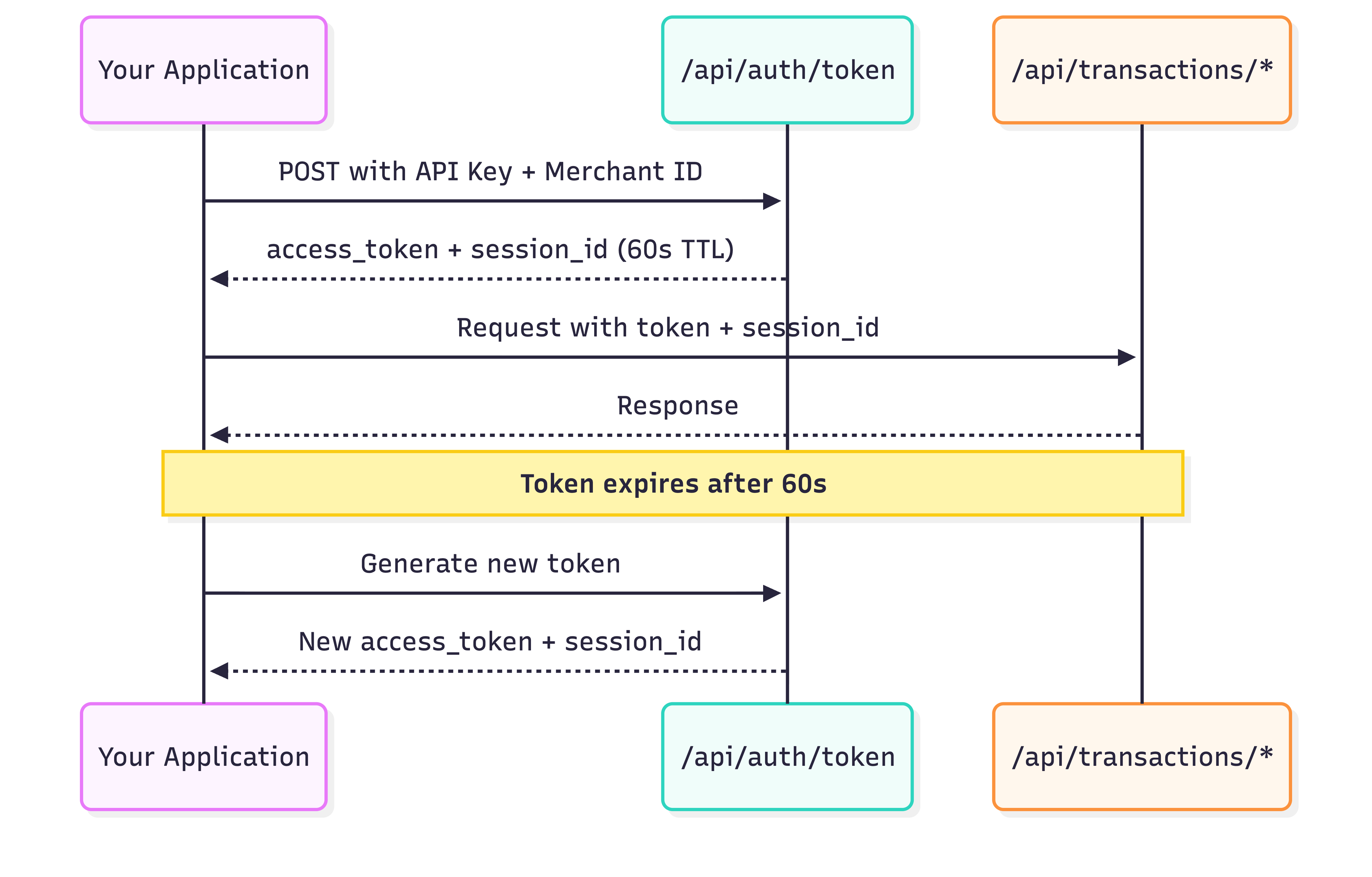
Token Authentication Overview 88Pay uses JWT tokens for API authentication. Each token is valid for 60 seconds and must be paired with a session ID for all API requests.
Why tokens? Long-lived credentials (API Keys) never leave your server. Short-lived tokens authenticate individual requests, limiting exposure if intercepted.
Authentication Architecture Benefits:
🔒 API Keys never exposed in requests
🚫 Limited blast radius if token leaked
📊 Session tracking and auditing
🔄 Easy credential rotation
Generate Token Endpoint POST https://api-sandbox.88pay.io/api/auth/token
Header Required Description x-api-key✅ Your API Key (starts with sk_test_ or sk_live_) x-merchant-id✅ Your Merchant ID (format: MCH-{COUNTRY}-{ID})
No request body required. Authentication is header-based only.
Request Examples cURL
JavaScript (async/await)
Python
PHP
Go
curl -X POST "https://api-sandbox.88pay.io/api/auth/token" \
  -H "x-api-key: sk_test_a1b2c3d4e5f6g7h8" \
  -H "x-merchant-id: MCH-COL-TEST-12345"
Response Structure Success (200)
401 Unauthorized
403 Forbidden
429 Rate Limited
{ "status" : "Success" , "code" : 200 , "message" : "Token generated successfully" , "data" : { "access_token" : "eyJhbGciOiJFUzI1NiIsInR5cCI6IkpXVCJ9.eyJtZXJjaGFudF9pZCI6Ik1DSC1DT0wtMjlaVFA0IiwiaWF0IjoxNzM3MTQwNDAwLCJleHAiOjE3MzcxNDA0NjB9.MEUCIQDx..." , "expires_in" : 60 , "session_id" : "sess_53a2cfc4-441e-4554-b560-4e008784d98e" } }
Field Descriptions: Field Type Description access_tokenstring JWT token for API authorization (use in Authorization header) expires_innumber Token lifetime in seconds (always 60) session_idstring Session identifier (use in x-session-id header)
{ "status" : "Error" , "code" : 401 , "message" : "Invalid API key or merchant ID" }
Common causes:
Incorrect API Key or Merchant ID
Typos or whitespace in credentials
Using sandbox credentials with production endpoint
Credentials not loaded from environment variables
Fix: // Verify credentials are loaded correctly console . log ( 'API Key:' , process . env . EIGHTY_EIGHT_PAY_API_KEY ?. substring ( 0 , 15 ) + '...' ); console . log ( 'Merchant ID:' , process . env . EIGHTY_EIGHT_PAY_MERCHANT_ID ); // Check for whitespace const apiKey = process . env . EIGHTY_EIGHT_PAY_API_KEY ?. trim (); const merchantId = process . env . EIGHTY_EIGHT_PAY_MERCHANT_ID ?. trim ();
{ "status" : "Error" , "code" : 403 , "message" : "Access denied" }
Common causes:
Account not approved (KYC pending)
Account suspended
IP address blocked (if whitelisting enabled)
Fix:
Check account status in dashboard
Complete KYC verification
Contact support@88pay.io
{ "status" : "Error" , "code" : 429 , "message" : "Rate limit exceeded. Please try again later." }
Common causes:
Generating tokens too frequently
Not implementing token caching
Hitting 10/minute or 100/hour limit
Fix: Implement token caching (see below) and exponential backoff: async function generateTokenWithRetry ( retries = 3 ) { for ( let i = 0 ; i < retries ; i ++ ) { try { return await generateToken (); } catch ( error ) { if ( error . status === 429 && i < retries - 1 ) { const delay = Math . pow ( 2 , i ) * 1000 ; // 1s, 2s, 4s await new Promise ( resolve => setTimeout ( resolve , delay )); } else { throw error ; } } } }
Token Caching Strategy Critical: Don’t generate a new token for every request! This wastes resources and triggers rate limits.
Recommended Implementation Cache tokens for 50 seconds (10-second safety buffer before 60s expiry):
class TokenManager { constructor ( apiKey , merchantId , baseUrl ) { this . apiKey = apiKey ; this . merchantId = merchantId ; this . baseUrl = baseUrl ; this . cache = null ; this . expiresAt = null ; } async getToken () { // Return cached token if valid (10s safety margin) if ( this . cache && Date . now () < this . expiresAt - 10000 ) { return this . cache ; } // Generate new token const response = await fetch ( ` ${ this . baseUrl } /api/auth/token` , { method: 'POST' , headers: { 'x-api-key' : this . apiKey , 'x-merchant-id' : this . merchantId } }); if ( ! response . ok ) { throw new Error ( `Token generation failed: ${ response . status } ` ); } const { data } = await response . json (); // Cache with 50s TTL this . cache = data ; this . expiresAt = Date . now () + 50000 ; return data ; } // Convenience method for making authenticated requests async makeRequest ( endpoint , options = {}) { const { access_token , session_id } = await this . getToken (); return fetch ( ` ${ this . baseUrl }${ endpoint } ` , { ... options , headers: { ... options . headers , 'Authorization' : `Bearer ${ access_token } ` , 'x-session-id' : session_id , 'Content-Type' : 'application/json' } }); } } // Initialize once (singleton pattern) const tokenManager = new TokenManager ( process . env . EIGHTY_EIGHT_PAY_API_KEY , process . env . EIGHTY_EIGHT_PAY_MERCHANT_ID , process . env . EIGHTY_EIGHT_PAY_BASE_URL || 'https://api-sandbox.88pay.io' ); // Usage const payment = await tokenManager . makeRequest ( '/api/transactions/charges' , { method: 'POST' , body: JSON . stringify ({ /* payment data */ }) });
import os import time import requests from typing import Dict, Optional class TokenManager : def __init__ ( self , api_key : str , merchant_id : str , base_url : str ): self .api_key = api_key self .merchant_id = merchant_id self .base_url = base_url self .cache: Optional[Dict] = None self .expires_at: Optional[ float ] = None def get_token ( self ) -> Dict: """Get cached token or generate new one""" # Return cached token if valid (10s safety margin) if self .cache and time.time() < self .expires_at - 10 : return self .cache # Generate new token response = requests.post( f " { self .base_url } /api/auth/token" , headers = { "x-api-key" : self .api_key, "x-merchant-id" : self .merchant_id } ) response.raise_for_status() data = response.json()[ "data" ] # Cache with 50s TTL self .cache = data self .expires_at = time.time() + 50 return data def make_request ( self , endpoint : str , method : str = "GET" , ** kwargs ) -> requests.Response: """Make authenticated request to 88Pay API""" token_data = self .get_token() headers = kwargs.get( "headers" , {}) headers.update({ "Authorization" : f "Bearer { token_data[ 'access_token' ] } " , "x-session-id" : token_data[ "session_id" ], "Content-Type" : "application/json" }) return requests.request( method, f " { self .base_url }{ endpoint } " , headers = headers, ** kwargs ) # Initialize once (singleton pattern) token_manager = TokenManager( os.getenv( "EIGHTY_EIGHT_PAY_API_KEY" ), os.getenv( "EIGHTY_EIGHT_PAY_MERCHANT_ID" ), os.getenv( "EIGHTY_EIGHT_PAY_BASE_URL" , "https://api-sandbox.88pay.io" ) ) # Usage payment = token_manager.make_request( "/api/transactions/charges" , method = "POST" , json = { "flow" : "PAYIN" , ... } )
<? php class TokenManager { private $apiKey ; private $merchantId ; private $baseUrl ; private $cache = null ; private $expiresAt = null ; public function __construct ( $apiKey , $merchantId , $baseUrl ) { $this -> apiKey = $apiKey ; $this -> merchantId = $merchantId ; $this -> baseUrl = $baseUrl ; } public function getToken () { // Return cached token if valid (10s safety margin) if ( $this -> cache && time () < $this -> expiresAt - 10 ) { return $this -> cache ; } // Generate new token $curl = curl_init (); curl_setopt_array ( $curl , [ CURLOPT_URL => $this -> baseUrl . '/api/auth/token' , CURLOPT_RETURNTRANSFER => true , CURLOPT_POST => true , CURLOPT_HTTPHEADER => [ 'x-api-key: ' . $this -> apiKey , 'x-merchant-id: ' . $this -> merchantId ], ]); $response = curl_exec ( $curl ); $httpCode = curl_getinfo ( $curl , CURLINFO_HTTP_CODE ); curl_close ( $curl ); if ( $httpCode !== 200 ) { throw new Exception ( "Token generation failed: HTTP $httpCode " ); } $data = json_decode ( $response , true )[ 'data' ]; // Cache with 50s TTL $this -> cache = $data ; $this -> expiresAt = time () + 50 ; return $data ; } public function makeRequest ( $endpoint , $method = 'GET' , $body = null ) { $tokenData = $this -> getToken (); $curl = curl_init (); $headers = [ 'Authorization: Bearer ' . $tokenData [ 'access_token' ], 'x-session-id: ' . $tokenData [ 'session_id' ], 'Content-Type: application/json' ]; curl_setopt_array ( $curl , [ CURLOPT_URL => $this -> baseUrl . $endpoint , CURLOPT_RETURNTRANSFER => true , CURLOPT_CUSTOMREQUEST => $method , CURLOPT_HTTPHEADER => $headers , CURLOPT_POSTFIELDS => $body ? json_encode ( $body ) : null ]); $response = curl_exec ( $curl ); curl_close ( $curl ); return json_decode ( $response , true ); } } // Initialize once $tokenManager = new TokenManager ( getenv ( 'EIGHTY_EIGHT_PAY_API_KEY' ), getenv ( 'EIGHTY_EIGHT_PAY_MERCHANT_ID' ), getenv ( 'EIGHTY_EIGHT_PAY_BASE_URL' ) ?: 'https://api-sandbox.88pay.io' ); // Usage $payment = $tokenManager -> makeRequest ( '/api/transactions/charges' , 'POST' , [ 'flow' => 'PAYIN' , ... ] ); ?>
Approach Tokens/Hour API Calls Needed Rate Limit Risk No caching 72 tokens 72 token requests ⚠️ High (72% of limit) 50s caching ~72 tokens 72 token requests ✅ Low (72% of limit but spread out) Shared instance 1-2 tokens 1-2 token requests ✅ Very low (less than 2%)
Use a singleton pattern (one TokenManager instance per application) to maximize cache effectiveness across all requests.
Using Tokens in Requests Once you have a token, include it in all API calls:
Authorization: Bearer {access_token}
x-session-id: {session_id}
Content-Type: application/json
Example Authenticated Request curl -X POST "https://api-sandbox.88pay.io/api/transactions/charges" \ -H "Authorization: Bearer eyJhbGciOiJFUzI1NiIs..." \ -H "x-session-id: sess_53a2cfc4-441e-4554-b560-4e008784d98e" \ -H "Content-Type: application/json" \ -d '{ "flow": "PAYIN", "method_code": "CARDS", "amount": 50000, "currency": "COP", "country": "COL" }'
Rate Limits Timeframe Limit Recommended Max with Caching Per minute 10 requests 1-2 requests Per hour 100 requests 72 requests
Exceeding rate limits returns 429 Too Many Requests. Implement exponential backoff and token caching to stay well below limits.
Troubleshooting
Token expires before I can use it
Symptoms:
401 errors on API requests
“Token expired” messages
Causes:
Network latency between token generation and use
System clock drift
Processing delay in application
Solutions:
Generate token immediately before use (within same function)
Synchronize system clock with NTP
Use 10-second safety margin in caching
// Good: Generate and use immediately const { access_token , session_id } = await getToken (); const payment = await createPayment ( access_token , session_id ); // Bad: Long delay between generation and use const token = await getToken (); await someOtherOperation (); // Time passes... const payment = await createPayment ( token ); // May be expired!
Getting 429 rate limit errors
Symptoms:
429 Too Many Requests responsesIntermittent authentication failures
Causes:
Generating token on every request
Multiple application instances without shared cache
Rapid testing/development
Solutions:
Implement 50-second token caching
Use singleton TokenManager
Share cache across instances (Redis, Memcached)
// Bad: New token every request app . post ( '/payment' , async ( req , res ) => { const token = await generateToken (); // DON'T DO THIS // ... }); // Good: Cached token const tokenManager = new TokenManager ( ... ); // Created once app . post ( '/payment' , async ( req , res ) => { const token = await tokenManager . getToken (); // Uses cache // ... });
Tokens work in Postman but fail in application
Symptoms:
Manual requests succeed
Application requests fail with 401
Causes:
Environment variables not loaded
Incorrect header formatting
Missing x-session-id header
Solutions:
Verify environment variables are loaded:
console . log ( 'API Key loaded:' , !! process . env . EIGHTY_EIGHT_PAY_API_KEY ); console . log ( 'Merchant ID:' , process . env . EIGHTY_EIGHT_PAY_MERCHANT_ID );
Check header format:
// Correct headers : { 'Authorization' : `Bearer ${ access_token } ` , 'x-session-id' : session_id } // Wrong headers : { 'Authorization' : access_token , // Missing "Bearer" 'session-id' : session_id // Wrong header name }
Concurrent requests using same token fail
Symptoms:
Some requests succeed, others fail
Intermittent 401 errors under load
Causes:
Race condition in token generation
Multiple instances generating tokens simultaneously
Solutions: Use mutex/lock for token generation: class TokenManager { constructor (...) { // ... this . generating = false ; this . waitingCallbacks = []; } async getToken () { if ( this . cache && Date . now () < this . expiresAt - 10000 ) { return this . cache ; } // If already generating, wait for it if ( this . generating ) { return new Promise ( resolve => { this . waitingCallbacks . push ( resolve ); }); } this . generating = true ; try { // Generate token... const data = await this . _generateToken (); // Notify waiting callbacks this . waitingCallbacks . forEach ( cb => cb ( data )); this . waitingCallbacks = []; return data ; } finally { this . generating = false ; } } }
Security Considerations Never Log Tokens
Transport Security
Token Storage
❌ Don’t do this: console . log ( 'Token:' , access_token ); // EXPOSED IN LOGS! logger . info ({ token: access_token }); // EXPOSED!
✅ Do this: // Log only non-sensitive metadata console . log ( 'Token generated:' , { expires_at: new Date ( Date . now () + 60000 ), session_id: session_id // OK to log }); // Or mask the token console . log ( 'Token:' , access_token . substring ( 0 , 20 ) + '...' );
Always use HTTPS: // Good: HTTPS const baseUrl = 'https://api.88pay.io' ; // Bad: HTTP (will fail) const baseUrl = 'http://api.88pay.io' ;
Verify SSL certificates in production: // Node.js: Don't disable certificate verification process . env . NODE_TLS_REJECT_UNAUTHORIZED = "1" ; // Keep enabled // Python: Use proper SSL context import ssl context = ssl . create_default_context () # Don 't set verify=False in requests.post( )
In-memory only (never persist): // Good: Memory cache class TokenManager { constructor () { this . cache = null ; // In-memory only } } // Bad: File/database storage fs . writeFileSync ( 'token.json' , JSON . stringify ({ token })); // DON'T! await db . tokens . insert ({ access_token }); // DON'T!
Why? Tokens are short-lived (60s). Persisting them:
Adds complexity
Introduces security risk
Provides no benefit (they expire quickly)
Testing Your Implementation Verify your token generation works correctly:
async function testTokenGeneration () { console . log ( '🧪 Testing token generation... \n ' ); // Test 1: Basic generation console . log ( 'Test 1: Basic token generation' ); try { const token1 = await tokenManager . getToken (); console . log ( '✅ Token generated successfully' ); console . log ( ' - Access token length:' , token1 . access_token . length ); console . log ( ' - Session ID format:' , token1 . session_id . startsWith ( 'sess_' )); } catch ( error ) { console . error ( '❌ Failed:' , error . message ); } // Test 2: Caching console . log ( ' \n Test 2: Token caching' ); const start = Date . now (); const token2 = await tokenManager . getToken (); const duration = Date . now () - start ; console . log ( duration < 100 ? '✅ Cached (fast)' : '❌ Not cached (slow)' ); console . log ( ' - Duration:' , duration + 'ms' ); // Test 3: Expiration console . log ( ' \n Test 3: Token expiration' ); console . log ( '⏳ Waiting 51 seconds for token to expire...' ); await new Promise ( resolve => setTimeout ( resolve , 51000 )); const token3 = await tokenManager . getToken (); console . log ( '✅ New token generated after expiry' ); console . log ( ' - Different from previous:' , token1 . access_token !== token3 . access_token ); console . log ( ' \n ✨ All tests passed!' ); } // Run tests testTokenGeneration ();
Next Steps
Create Operations Use tokens to process payments
Setup Webhooks Receive transaction notifications
Error Handling Handle failures gracefully
API Reference Full technical specification